Friday, July 31, 2020

How to List the Users in Linux

List Out the Users in Linux

There may be the situations where you wanted to list out all the users available in Linux. In order to get the user details we have to use few commands as below.

The local user information is placed under /etc/passwd file. Each records in this file is actually a login information. So we will need to read this file. We can use cat to view the users as below.

$ cat   /etc/passwd

If the number of records are more then you can use less as below:

less /etc/passwd

Command:


The Output of this command will be as below:

Output:


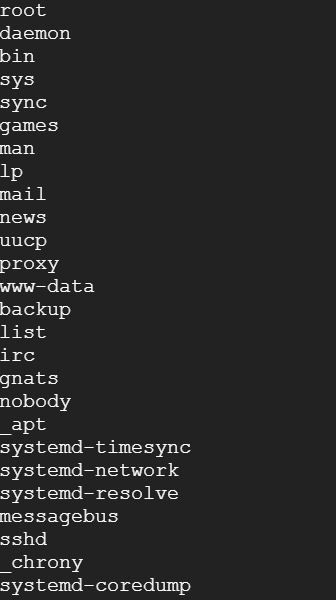
Now, If you want to display only username then you can use cut command to print only the first column which holds the username as below:

$ cut -d: -f1 /etc/passwd


Output:


There is one another command to display the list of user in linux i.e. getend.This command displays the entries from databases configured in /etc/nsswitch.conf file

You can use this command as below to list the users

$ getent passwd

And to list only the user name you can use this command as below

$ getent passwd | cut -d: -f1


Command:
$ getent passwd | cut -d: -f1


Output:


Thank You!
Vimal


How To Find Top Processes By Memory and CPU in Linux

Top Processes Sorted By Memory/CPU Usage

During server health checkup sometimes we try to check the expensive processes running on Linux machine. It is very easy in windows but for Linux you need to type command in order to achieve the same.

Below is the command which we can use. It will not show you the full list. However if you want to see the full list you can remove |head to get full list.

Command:

    @instance-1:~$ ps -eo user,pid,ppid,cmd,%mem,%cpu --sort=-%mem |head 


Output:


Thank You!
Vimal


Friday, July 24, 2020

Log Buffer In Cassandra


Do we have anything  like Log Buffer in memory related to commit log file???

I have started learning Cassandra few months ago and was confused with term "Log buffer" in cassandra. I have gone through several links/documents and they were just telling me about commit log. If you search for Cassandra architecture diagram, it says when a write occurs, Cassandra writes to the memtable(In Memory) and commit log (On DISK).

So, I was more curious to know about log buffer and its functionality. As if it is in memory so what will happen during sudden failure...

I tried one more time to look for the answers and I got this time :)

Summary of this Blog is: Yes, 😊 We have a log buffer in Cassandra which is in OS as Cassandra don’t have any OS like SQL. But the writes are not acknowledged in Cassandra until unless it is written to Disk (It is tunable). 

The setting which control this is: commitlog_sync  (Batch Or periodic) 

By default cassandra support BatchWhich says writes are not acknowledged until fsynced to disk.

PeriodicYou can think of this as delayed durability in SQL server. If you are from SQL Background like me.

==============================================================
Below are detailed info:

When we try to read in detail about cassandra commit log, this is where you will get confused..Only I f you are a beginner like me ðŸ˜Š You will find a term "Log Buffer" and will not get much information about it.  So, The reference to "commit log buffer in memory" is talking about OS buffer cache, not a memory structure in Cassandra.  We can also refer the code regarding same if you know little bit about java programming. There is no separate in-memory structure for the commit log, but rather the mutation is serialized and written to a file-backed buffer.

Cassandra comes with two strategies for managing fsync on the commit log. (Batch and Periodic)

What Cassandra Documentation Says:

Commitlogs are an append only log of all mutations local to a Cassandra node. Any data written to Cassandra will first be written to a commit log before being written to a memtable. This provides durability in the case of unexpected shutdown. On startup, any mutations in the commit log will be applied.

 commitlog_sync: may be either “periodic” or “batch.”

Batch: In batch mode, Cassandra won’t ack writes until the commit log has been fsynced to disk. It will wait “commitlog_sync_batch_window_in_ms” milliseconds between fsyncs. This window should be kept short because the writer threads will be unable to do extra work while waiting. You may need to increase concurrent_writes for the same reason.

commitlog_sync_batch_window_in_ms: Time to wait between 
                                   “batch” fsyncs
Default Value: 2

Periodic: In periodic mode, writes are immediately ack’ed, and the CommitLog is simply synced every “commitlog_sync_period_in_ms” milliseconds.
commitlog_sync_period_in_ms: Time to wait between 
                                 “periodic” fsyncs
    Default Value: 10000


Default Value in cassandra is: batch which says that there will be no data loss in case of sudden failure..


Thank You For Reading this Blog

Wednesday, May 6, 2020

BCP with MultiSubNetFailover option

Recently, I was stuck with one issue where I was getting a login timeout error when running a BCP command on a SQL 2016 "AlwaysOnAvailabilityGroup" with multisubnet environment.

Our application which was using the JDBC driver to connect to database was running fine.

But when we were trying to connect the database with bcp command it was getting timeout.

I found one workaround at below link which says to use the -l parameter. It will extend the timeout value and will start working. This was taking time as it was resolving the IP's in serial manner.
The above option was working fine but was slow. So, I tried some options with bcp command line and found one which worked in my case.

All you have to do is to pass the option ;multisubnetfailover=yes in command line after the listener name as below:

c:\Windows\System32> bcp "SELECT 1" queryout c:\temp_log\bcp12.log -S ListenerName;multisubnetfailover=yes   -T

I changed the connections in my case and started working fine after that.

Please let me know if this works for you :)

Thank You!
Vimal

Monday, December 23, 2019

The query processor ran out of internal resources and could not produce a query plan. Error 8623 Severity 16 State 1


The query processor ran out of internal resources and could not produce a query plan, Error 8623 Severity 16 State 1

Error: 8623, Severity: 16, State: 1.
"The query processor ran out of internal resources and could not produce a query plan. This is a rare event and only expected for extremely complex queries or queries that reference a very large number of tables or partitions. Please simplify the query. If you believe you have received this message in error, contact Customer Support Services for more information."


We were getting the above error very frequently in one of my production environments. The query was coming from application servers, so we were not able to pin point the query. The SQL also does not capture the failed queries by default.

Microsoft says that there may be couple of reason if your query fails with this error. As we were not having the original query, so it was difficult for us to proceed.

One of the obvious reasons is that a Complex query or a large number of tables used as a query reference-

Complex queries specially with many entries in the "IN" clause (> 10,000).

I searched on google and found that we can capture such queries by using extended event.
You can find the script on below link of Brent Ozar website:


I used below script to create extended event and finally I was able to find the problematic query.

Script to create extended Event: You may need to change the directory file in your case

CREATE EVENT SESSION [FailedQueries] ON SERVER
ADD EVENT sqlserver.error_reported
    (ACTION(sqlserver.client_app_name, sqlserver.client_hostname, 
        sqlserver.database_name, sqlserver.sql_text, sqlserver.username)
    WHERE ([severity]> 15))
 ADD TARGET package0.event_file (SET
    filename = N'B:\Test\XEvents\FailedQueries.xel'
    ,metadatafile = N'B:\Test\XEvents\FailedQueries.xem'
    ,max_file_size = (5)
    ,max_rollover_files = (10))
 WITH (STARTUP_STATE = ON)
GO


Use below query to see the logs:

SELECT
    [XML Data],
    [XML Data].value('(/event[@name=''error_reported'']/@timestamp)[1]','DATETIME')             AS [Timestamp],
    [XML Data].value('(/event/action[@name=''database_name'']/value)[1]','varchar(max)')        AS [Database],
    [XML Data].value('(/event/data[@name=''message'']/value)[1]','varchar(max)')                AS [Message],
    [XML Data].value('(/event/action[@name=''sql_text'']/value)[1]','nvarchar(max)')             AS [Statement]
FROM     (SELECT         OBJECT_NAME              AS [Event],
        CONVERT(XML, event_data) AS [XML Data]
    FROM         sys.fn_xe_file_target_read_file
    ('B:\Test\XEvents\FailedQueries*.xel',NULL,NULL,NULL)) as FailedQueries
                    where [XML Data].value('(/event/action[@name=''sql_text'']/value)[1]','varchar(max)')  is not null
                    and  [XML Data].value('(/event/data[@name=''message'']/value)[1]','varchar(max)')  like '%The query processor ran out of internal resources and could not produce a query plan %' ;
GO


The query which we found in our case was having a lot of values (>10000) inside IN Clause also the query was running with legacy optimizer on SQL server 2016.

In order to test the query, I tried to run with hint OPTION( QUERYTRACEON 2312) but was still failing with same error. This hint allows SQL server to execute the query with help of new query optimizer (>SQL2012).

And finally I tried to run the same query with help of hint OPTION(FORCE ORDER) and the query completed without any issue.


There are some other workaround to as per Microsoft which are as below:

You could try to run the query using the hint option (force order), option (hash join), option (merge join), option (querytraceon 4102)  with a plan guide. By enabling the traceflag 4102, we will revert the behavior to SQL Server 2000 for handling semi-joins.

Please share if there was any other issue in your case.



Friday, December 13, 2019

"syspolicy_purge_history" SQL Agent Job is failing with error "Cannot find drive A drive with the name 'SQLSERVER' does not exist"


The SQL Agent Job "syspolicy_purge_history" was failing in our environment since we have upgraded our SQL server instance from SQL 2008R2 to SQL2012. The job was failing at step-3 named as "Erase Phantom System Health Records" We have tried each and every article available over internet, but nothing was helpful in our case. After a lot of troubleshooting my friend Desh found the solution for it. 

There are still lot of DBA's searching the fix of same issue. So, I want to share the all steps which fixed the issue. You can try it in your case and let us know if this works.

Issue Details:

SQL Server version: SQL Server 2012
Job Name: syspolicy_purge_history

Error:
Executed as user: "XXXXX". The job script encountered the following errors. 
These errors did not stop the script:  A job step received an error at line 1 in a PowerShell script. The corresponding line is 'import-module SQLPS  -DisableNameChecking'. Correct the script and reschedule the job. The error information returned by PowerShell is: 'The specified module 'SQLPS' was not loaded because no valid module file was found in any module directory.  '  A job step received an error at line 2 in a PowerShell script. The corresponding line is '(Get-Item SQLSERVER:\SQLPolicy\ServerName$a).EraseSystemHealthPhantomRecords()'. Correct the script and reschedule the job. The error information returned by PowerShell is: 'Cannot find drive. A drive with the name 'SQLSERVER' does not exist.  '  A job step received an error at line 2 in a PowerShell script. The corresponding line is '(Get-Item SQLSERVER:\SQLPolicy\


Steps to Fix the issue:

The first step is to check if SQLPS folder exists to below location:

C:\Program Files\Microsoft SQL Server\110\Tools\PowerShell\Modules


Now Open Computer Properties and then click on advance system settings> environment variables> Copy the environment path to a notepad file


%ProgramFiles%\WindowsPowerShell\Modules;
%SystemRoot%\system32\WindowsPowerShell\v1.0\Modules

Now copy the SQLPS folder from location “C:\Program Files\Microsoft SQL Server\110\Tools\PowerShell\Modules“ to below locations which we found under environment variables:

 %ProgramFiles%\WindowsPowerShell\Modules
                                           %SystemRoot%\system32\WindowsPowerShell\v1.0\Modules

You can Open the above two locations via start>run> and then paste location and then Enter.
Once this folder is copied to these locations. Try to run the below command from Powershell.

Open Powershell  as admin and then execute the below command.
import-module SQLPS  -DisableNameChecking


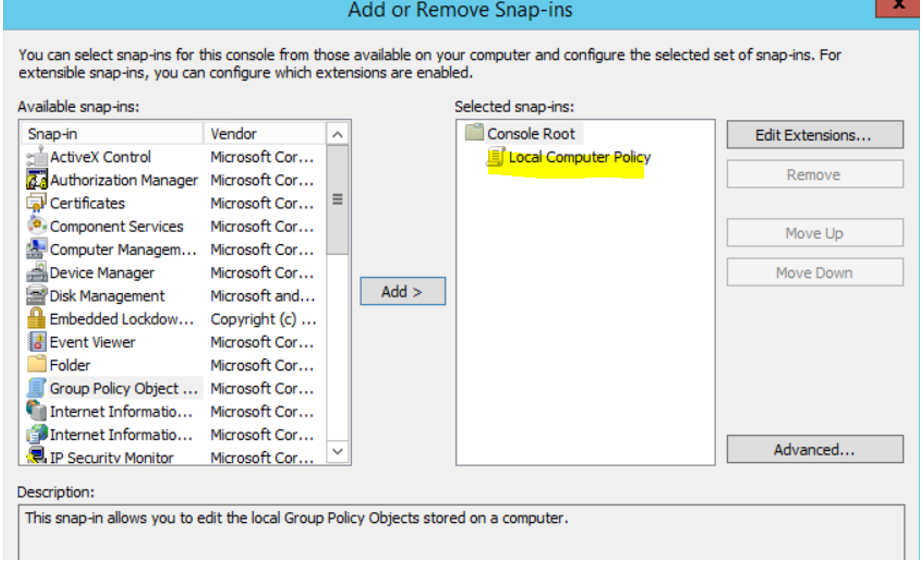
Once import module is done. Open the Group Policy Object Editor as below:
  1.  Start > run > "mmc"
  2.  File > Add/Remove Snap-In...
  3.  Under Available snap-ins, select "Group Policy Object Editor" and click Add, then Finish.
  4.  Click OK to snap-in the GPO Editor

Now navigate to the specific policy:
  1.  Console Root > Local Computer Policy > Computer Configuration > Administrative Templates > Windows Components > Windows Powershell
  2.  Open-up the "Turn on Script Execution" policy setting
  3.  Enable Script Execution and in Options select “ Allow All Scripts”. Apply the setting and click on OK.
  4.  Exit from this window

Below is the screen shot for above steps for your reference:


Exit from this window and during save pop-up dialog click on No.


Now Try to run the Job it should be running without any issue.


Hope this works in your case.

Sunday, September 1, 2019

Memtable and SStable In Cassandra


What are Memtable and SStable In Cassandra?

Cassandra processes data at several stages on the write path, starting with the immediate logging of a write and ending in with a write of data to disk:
  • 1.     Logging data in the commit log
  • 2.     Writing data to the memtable
  • 3.     Flushing data from the memtable
  • 4.     Storing data on disk in SSTables

 memtable

When a write occurs, Cassandra stores the data in a memory structure called memtable, and to provide configurable durability, it also appends writes to the commit log on disk. The commit log receives every write made to a Cassandra node, and these durable writes survive permanently even if power fails on a node. The memtable is a write-back cache of data partitions that Cassandra looks up by key. The memtable stores writes in sorted order until reaching a configurable limit, and then is flushed.

When memtable contents exceed a configurable threshold or the commitlog space exceeds the commitlog_total_space_in_mb, the memtable data, which includes indexes, is put in a queue to be flushed to disk. To flush the data, Cassandra sorts memtables by partition key and then writes the data to disk sequentially. The process is extremely fast because it involves only a commitlog append and the sequential write.

Data in the commit log is purged after its corresponding data in the memtable is flushed to the SSTable. The commit log is for recovering the data in memtable in the event of a hardware failure.

 SSTable:

A sorted string table (SSTable) is an immutable data file to which Cassandra writes a memtable. Cassandra flushes all the data in the memtables to the SSTables once the memtables reach a threshold value. Consequently, a partition is typically stored across multiple SSTable files. A number of other SSTable structures exist to assist read operations:
For each SSTable, Cassandra creates these structures:
Data (Data.db) 
The SSTable data
Primary Index (Index.db) 
Index of the row keys with pointers to their positions in the data file
Bloom filter (Filter.db) 
A structure stored in memory that checks if row data exists in the memtable before accessing SSTables on disk
Compression Information (CompressionInfo.db) 
A file holding information about uncompressed data length, chunk offsets and other compression information
Statistics (Statistics.db) 
Statistical metadata about the content of the SSTable
Digest (Digest.crc32, Digest.adler32, Digest.sha1) 
A file holding adler32 checksum of the data file
CRC (CRC.db) 
A file holding the CRC32 for chunks in an uncompressed file.
SSTable Index Summary (SUMMARY.db) 
A sample of the partition index stored in memory
SSTable Table of Contents (TOC.txt) 
A file that stores the list of all components for the SSTable TOC
Secondary Index (SI_.*.db) 
Built-in secondary index. Multiple SIs may exist per SSTable

References: Datastax Docs


Bloom Filters In Cassandra


In General, A Bloom filter is a space-efficient probabilistic data structure, conceived by Burton Howard Bloom in 1970, that is used to test whether an element is a member of a set. False positive matches are possible, but false negatives are not – in other words, a query returns either "possibly in set" or "definitely not in set".

In Cassandra, Bloom filters are used to boost the performance of reads. It is non-deterministic algorithms for testing whether an element is a member of a set. They are non-deterministic because it is possible to get a false-positive read from a Bloom filter, but not a false-negative.

Bloom filters work by mapping the values in a data set into a bit array and condensing a larger data set into a digest string using a hash function. The digest, by definition, uses a much smaller amount of memory than the original data would. The filters are stored in memory and are used to improve performance by reducing the need for disk access on key look-ups. Disk access is typically much slower than memory access. So, in a way, a Bloom filter is a special kind of cache.

When a query is performed, the Bloom filter is checked first before accessing disk. Because false-negatives are not possible, if the filter indicates that the element does not exist in the set, it certainly doesn’t; but if the filter thinks that the element is in the set, the disk is accessed to make sure.

  
Bloom filters are implemented by the org.apache.cassandra.utils.BloomFilter
class. Cassandra provides the ability to increase Bloom filter accuracy (reducing the number of false positives) by increasing the filter size, at the cost of more memory. This false positive chance is tuneable per table.


An example of a Bloom filter, representing the set {x, y, z}. The colored arrows show the positions in the bit array that each set element is mapped to. The element w is not in the set {x, y, z}, because it hashes to one bit-array position containing 0. For this figure, m = 18 and k = 3.


References:  wikipedia, Cassandra The Definitive Guide

SQL Server 2016 Database Mail Is Not Working


If you are working on SQL Server 2016 and your machine is having .NET Framework higher than 3.5 then you will not be able to send using DB email.


As Per Microsoft Support, there's a bug in SQL server 2016 Setup that causes the database mail not to work without .net 3.5. So they provided a workaround for this bug  by creating a DatabaseMail.exe.config file. The steps to create this file are as below


Create the DatabaseMail.exe.config and drop it next to the DatabaseMail.exe under the Binn folder. You can use notepad.exe or any other editor to edit it. Just make sure you save it by using UTF-8 encoding (in notepad.exe, select Save As... and in the Encoding combo box, select UTF-8): 

         <?xml version="1.0" encoding="utf-8" ?>
         <configuration>
         <startup useLegacyV2RuntimeActivationPolicy="true"> 
         <supportedRuntime version="v4.0"/>     
         <supportedRuntime version="v2.0.50727"/>
         </startup>
         </configuration>


Note:
Sometimes I have observed that the config file get disappear automatically after reboot. So, to fix that you can create a SQL agent job which will create/copy this file (DatabaseMail.exe.config ) in Binn folder and schedule to run it after every service reboot. This way you can overcome with this issue.