Showing posts with label Backup and Restore. Show all posts

Sunday, March 1, 2015

Script to Get Database Backup Time and Backup location..

We can use below T-SQL script to find the Database Backup Time and Backup location:

SELECT B.database_name,B.user_name As [User],
F.physical_device_name,B.backup_start_date as Backup_time,
CASE B.[Type] WHEN 'D' THEN 'Full'
WHEN 'I' THEN 'Differential'
WHEN 'L' THEN 'Transaction Log'
END AS BackupType FROM msdb.dbo.backupset B
INNER JOIN msdb.dbo.backupmediafamily F ON B.media_set_id = F.media_set_id
--WHERE B.database_name = DB_NAME() --uncomment this line for a signle Database
ORDER BY backup_start_date DESC
GO


Thanks!!!

Tuesday, February 24, 2015

Error "Msg 3132, Level 16, State 1, Line 1. The media set has 2 media families but only 1 are provided. All members must be provided."

Sometimes when we try to restore database in Sql server we get below error:

"Msg 3132, Level 16, State 1, Line 1
The media set has 2 media families but only 1 are provided. All members must be provided.
Msg 3013, Level 16, State 1, Line 1
RESTORE DATABASE is terminating abnormally."

In SQL Server 2008 R2 If you are using SSMS then you will get error window as below:


In SQL Server 2008 R2Using TSQL:


In SQL Server 2014 If you are using SSMS then you will get error window as below: In this case the backup was distributed into 3 files: We have provided 2 files but missed to add 3rd backup file.


In SQL Server 2014 TSQL:


This error message appears when the original backup was done as a striped backup where the backup stream was split into multiple destination files. And When you want to restore, you need to specify all of the same backup files which were used to take the backup. If not then you will get the above error.

So in order to solve above problem we have to provide the missing backup file and then restore it. In case we have lost that missing backup file then we'll not be able to restore that database until unless we take a fresh backup of that particular database.

To Restore the above database provide all 3 backup files using TSQL Or SSMS  it will be restored successfully:

E.g. Using TSql:


So this is how we can solve this problem.

How To Take Striped backup Of our Database In SQL Server:

Let see how can we take striped backup of our databases. Suppose, We have a sample database [StripedBackup]. Now we are  going to distribute the backup into 3 different files. We can use SSMS or TSQL code for same.

Usign TSQL you can take Striped backup as:

BACKUP DATABASE STRIPEDBACKUP
TO DISK = 'C:\BACKUP\STRIPEDBACKUP1.BAK',
DISK =  'C:\BACKUP\STRIPEDBACKUP2.BAK',
DISK =  'C:\BACKUP\STRIPEDBACKUP3.BAK'


If you want to take backup using SSMS then you can follow:

Right-click on the name of the database and then select 'Tasks'>'Back Up' Then add files as below screen shot and click ok.


So, this is how we can distribute our backup file into different files.


Thanks For Reading this Blog

Friday, December 26, 2014

How to take Partial Backup Of Database in SQL Server

Hello Friend!!! Hope You are doing great. In this Small blog post I'm Going to explain how to take Partial Backup Of Database in SQL Server..

What Is Partial Backup?

As Per MSDN
"Partial backups are useful whenever you want to exclude read-only filegroupsA partial backup resembles a full database backup, but a partial backup does not contain all the filegroups. Instead, for a read-write database, a partial backup contains the data in the primary filegroup, every read-write filegroup, and, optionally, one or more read-only files. A partial backup of a read-only database contains only the primary filegroup."

This means that partial backups are only relevant for databases that contain read-only 
filegroups, If not then a partial backup will capture exactly the same data and objects as an equivalent full database backup.

Partial Backups are available to SQL Server 2005 and Later version. It was basically designed for large databases for which it will reduce backup and restore time.

How TO Take Partial Backup:

So Let see How to take Partial backup of SQL Server Database. Please use below script to create environment for same. You can not take partial Backup Using GUI so you have to use TSQL_script for same.

USE [master]
GO

CREATE DATABASE [PartialBackup] ON PRIMARY 
(   NAME = N'[PartialBackup]'
  , FILENAME = N'C:\Data\PartialBackups.mdf' 
  , SIZE = 10240KB  ), FILEGROUP [Read_only_Data] 
(   NAME = N'PartialBackup_ReadOnly'
  , FILENAME = N'C:\Data\PartialBackup_Read_Only.ndf' 
  , SIZE = 10240KB  ) LOG ON 
(   NAME = N'PartialBackup_log'
  , FILENAME = N'C:\Data\PartialBackups_log.ldf' 
  , SIZE = 10240KB )
GO

ALTER DATABASE [PartialBackup] SET RECOVERY SIMPLE
GO


Lets insert some data then we will change the filegroup "Read_only_Data" as read only.

USE [PartialBackup]
GO

CREATE TABLE dbo.RegistrationTable
    (
      ID INT IDENTITY  ,
      Name varchar(20)NOT NULL
    )
ON  [PRIMARY]
GO

CREATE TABLE dbo.Read_only_table
    (
      ID INT IDENTITY  ,
     Name varchar(20) NOT NULL
    )
ON  [Read_only_Data]
GO
INSERT  INTO dbo.RegistrationTable
VALUES  ('ABC'),('DEF'),('ETC')
INSERT  INTO dbo.Read_only_table
VALUES   ('XXX'),('YYY'),('ZZZ')

GO


Now Lets modify the FileGroup named as "Read_only_Data" to read only:

ALTER DATABASE [PartialBackup] MODIFY FILEGROUP [Read_only_Data] READONLY
GO

Now, before we take our first partial backup, we will take one backup copy of the whole database, including the read-only data, as the basis for any subsequent restore operations. 
By the way We can take a partial before taking a full database backup. But if you don't have a single full backup then from where you will restore read_only files in case of failure. So, its a good habit to take a full backup before partial backups.

USE [master]
GO
BACKUP DATABASE PartialBackup
TO DISK = N'C:\Data\PartialBackup_FULL.bak'
GO


We can see from Output that it processes both of our data files (Primary and Read_only_Data), plus the log file.

INSERT  INTO  PartialBackup.dbo.RegistrationTable
VALUES  ('WWW'),('RRRR'),('TTTTTT')
GO

Now take partial backup of database as:

Use PartialBackup

Go
BACKUP DATABASE PartialBackup READ_WRITE_FILEGROUPS
TO DISK = N'C:\Data\PartialBackup_PARTIAL_KA_Full.bak'
GO


We just added  READ_WRITE_FILEGROUPS in script to take partial backup as we want to exclude read_only filegroups from our backup.

We can see from the output that only the primary data file and the log file are processed. So we are good till now as we only wanted to exclude read_only FileGroup.

Now Lets see how to take Differential Partial Backup:

As we can Take differential database backups, which is based on a full database backup that is known as Base for differential backups. We can also take differential partial database backups that refer to a base partial database backup, and will capture only the data that changed in the read-write data files, since the base partial backup was taken.

Before taking partial differential backup insert few rows so that they can be included in your backup:

USE [PartialBackup]
GO
INSERT  INTO RegistrationTable
VALUES  ('FFFF'),(RTYU')
GO

We can use below script to take partial differential backup of database.

USE [master]
GO
BACKUP DATABASE [PartialBackup] READ_WRITE_FILEGROUPS
TO DISK = N'C:\Data\PartialBackup_PARTIAL_KA_Diff.bak'
WITH DIFFERENTIAL
GO

So this is how we can take partial backup of our database in SQL Server. In Next Blog I'm going to explain how to restore partial backups. It is almost same as normal backup restore process. Till then Enjoy. Wish you A Very Happy Weekends!!!

Thanks For Reading This Blog!!!

Tuesday, September 2, 2014

How to Recover a database that is in the "restoring" state!!!

Suppose you are restoring a database using multiple backup files, you would use the WITH NORECOVERY option for each backup file except the last oneIf you will go through the above steps your database will be recovered and will be usable.

But suppose in last backup file you have used WITH NORECOVERY option instead of WITH RECOVERY. In this situation your database will go into restoring state as below:


Now let see how to recover it without restoring additional backups. To do the same you can execute below command to bring the database online.

RESTORE DATABASE <Database_Name> WITH RECOVERY 

As per screen shot the database name is "Recover" so you will have to execute command as below:

RESTORE DATABASE Recover WITH RECOVERY 

After this your database will be available for use.


Thanks For Reading this Post!!!

Sunday, August 24, 2014

How to Create password protected Backup of database In SQL Server 2008.

SQL Server supports password protection for backup media and backup sets. Beginning with SQL Server 2012 the PASSWORD and MEDIAPASSWORD options are discontinued for creating backups. You can still restore backups created with passwords.

Let see how to create a database backup with password:

Create A Sample database 'Secure_Bakup' using below Script:

USE master
GO
CREATE DATABASE SECURE_BAKUP
GO
USE SECURE_BAKUP
GO
CREATE TABLE T1(ID INT ,NAME CHAR(30));
GO
INSERT INTO T1 VALUES(1,'ABC'),(2,'BCD'),(3,'TYS')
GO


we can see the records from Table T1 as below:

SELECT * FROM T1


Create the database backup as below:

BACKUP DATABASE SECURE_BAKUP TO 
DISK='C:\Program Files\Microsoft SQL Server\MSSQL10_50.MSSQLSERVER\MSSQL\Backup\SECURE_BAKUP.BAK' 
WITH PASSWORD='ABC@123' 


Lets verify the backup set without password:

RESTORE VERIFYONLY FROM  
DISK='C:\Program Files\Microsoft SQL Server\MSSQL10_50.MSSQLSERVER\MSSQL\Backup\SECURE_BAKUP.BAK'

You will get authentication error as below:

Msg 3279, Level 16, State 2, Line 1
Access is denied due to a password failure
Msg 3013, Level 16, State 1, Line 1
VERIFY DATABASE is terminating abnormally.


Lets try to restore the backup set without password:

RESTORE DATABASE [SECURE_BACKUP2] FROM  
DISK = N'C:\Program Files\Microsoft SQL Server\MSSQL10_50.MSSQLSERVER\MSSQL\Backup\SECURE_BAKUP.BAK' 
WITH  FILE = 1,  
MOVE N'SECURE_BAKUP' 
TO N'C:\Program Files\Microsoft SQL Server\MSSQL10_50.MSSQLSERVER\MSSQL\DATA\SECURE_BACKUP2.mdf',  
MOVE N'SECURE_BAKUP_log' 
TO N'C:\Program Files\Microsoft SQL Server\MSSQL10_50.MSSQLSERVER\MSSQL\DATA\SECURE_BACKUP2_1.LDF',  
STATS = 10
GO

You will get authentication error as below:

Msg 3279, Level 16, State 2, Line 1
Access is denied due to a password failure
Msg 3013, Level 16, State 1, Line 1
RESTORE DATABASE is terminating abnormally.


Now lets verify the same backup set with password:

RESTORE VERIFYONLY FROM  
DISK='C:\Program Files\Microsoft SQL Server\MSSQL10_50.MSSQLSERVER\MSSQL\Backup\SECURE_BAKUP.BAK' 
WITH PASSWORD='ABC@123'
GO

Its successful. "The backup set on file 1 is valid."


Now lets restore the backup set with password:

RESTORE DATABASE [SECURE_BACKUP2] FROM  
DISK = N'C:\Program Files\Microsoft SQL Server\MSSQL10_50.MSSQLSERVER\MSSQL\Backup\SECURE_BAKUP.BAK' 
WITH  FILE = 1,  
MOVE N'SECURE_BAKUP' 
TO N'C:\Program Files\Microsoft SQL Server\MSSQL10_50.MSSQLSERVER\MSSQL\DATA\SECURE_BACKUP2.mdf',  
MOVE N'SECURE_BAKUP_log' 
TO N'C:\Program Files\Microsoft SQL Server\MSSQL10_50.MSSQLSERVER\MSSQL\DATA\SECURE_BACKUP2_1.LDF',  
STATS = 10,
PASSWORD='ABC@123'
GO

And the database is successfully restored. Below is the output for same:

12 percent processed.
21 percent processed.
30 percent processed.
43 percent processed.
51 percent processed.
60 percent processed.
73 percent processed.
81 percent processed.
90 percent processed.
100 percent processed.
Processed 184 pages for database 'SECURE_BACKUP2', file 'SECURE_BAKUP' on file 1.
Processed 2 pages for database 'SECURE_BACKUP2', file 'SECURE_BAKUP_log' on file 1.
RESTORE DATABASE successfully processed 186 pages in 0.246 seconds (5.903 MB/sec).


So this is how we can create password protected backup in SQL Server 2008. 
Please make sure that you are using SQL Server 2008 as these features(Password and MEDIAPASSWORD) are discontinued from SQL Server 2012.

Thanks For Reading this Post!!! 

Monday, August 11, 2014

HOW WILL YOU VERIFY THAT A BACKUP SET IS VALID WITHOUT RETORING IT??

In Database, Backups are the starting point for any serious disaster recovery strategy. Taking SQL database backups on a regular basis is just the first step of recovery. It is also important to make sure that they are reliable and restorable. This is the only way to avoid unpleasant surprises in case of a disaster.

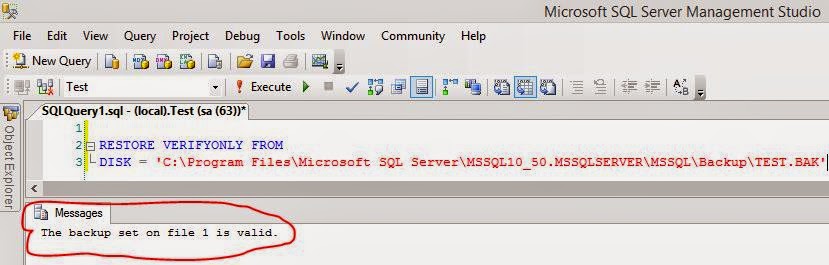
We can check the validation of a database backups without restring it. So, Let see how to do the same.

I have a backup file "Test.Bak" of test database which is available at below location:

C:\Program Files\Microsoft SQL Server\MSSQL10_50.MSSQLSERVER\MSSQL\Backup


To see the that this backup set is usable or not we will have to execute the below T-SQL code:

RESTORE VERIFYONLY FROM 
DISK = 'C:\Program Files\Microsoft SQL Server\MSSQL10_50.MSSQLSERVER\MSSQL\Backup\TEST.BAK'


So, this is how we can validate the Backup set.

Thanks For Reading this Post!!!