Showing posts with label SQL SERVER Locking. Show all posts

Tuesday, December 9, 2014

How to Identify Which Row is Locked in table??

I am sure most of us know how to see the information about locked table in SQL server but when we ask which row is locked and what data is present in that row then it can confused some of us. But believe me its very easy to find out and I promise in next 60 seconds you will also know how to get that information.

Lets create a sample database and then will create a scenario to explain the things.
Use below script to create a Sample Database.

CREATE DATABASE LOCKINFO
GO

Create Table in this database as Test1:

USE LOCKINFO
GO
CREATE TABLE TEST1 (ID INT IDENTITY PRIMARY KEY, NAME CHAR(200));
Go
insert into Test1 values ('Vimal'),('Kumar'), ('Prajapati')
Go

Select * from Test1;


Now update the record of ID=2 as below:

Begin Tran
Update Test1 set name ='Adam'
where id =2


Now open a new session in sql server and select  the data as below:

Select * from Test1 where ID =2


This query will go in wait state as there is one update transaction in another session which has not yet completed. Now using sys.dm_tran_locks view we can see the lock related information as below:   


The View sys.dm_tran_locks : Returns information about currently active lock manager resources in SQL Server. Each row represents a currently active request to the lock manager for a lock that has been granted or is waiting to be granted.

You can get database id by: select db_id('db_name'). In our case its 'LockInfo'

We can see the column resource description. The select query is waiting for the resource (61a06abd401c).This is Hash value of key for which our query is waiting to get executed. Now using this value we will try to find the row against it.

From here we can use DBCC Page or  %%lockres%% to examine the same.
Let see how to get the information about that row using page. If we look at the output of sys.dm_tran_locks the value against resource type PAGE is 1:154 in resource_description column. we can explore this page using DBCC page. Then we will search for hash key (61a06abd401c) in that page dump. We can see the exact row in output as below:

Using DBCC Page

Use LockInfo
GO
DBCC Traceon (3604)
DBCC Page(52,1,154,3)


So from screen shot it is clear that id=2 from table Test1 is locked.

Second way to find out the same is to use undocumented value  %%Lockres%% as below:

select * from test1 with(nolock) where  %%lockres%%  ='(61a06abd401c)' 

As table "Test1" is locked so we need to use nolock to select the data.


So from above screen shot it is clear that the row with id=2 is locked.

If your table is a heap then using DBCC Page you can identify the locked row.

 Thanks For Reading This Blog. 
 Your Comments/Suggestions are  welcome!!

References: Sql Server Internals 2008


Thursday, September 4, 2014

NOLOCK and READPAST Table Hint in SQL Server

Table Hint:


We use Table Hints to override the default behaviour of the query optimizer for the duration of the data manipulation language (DML) statement by specifying a locking method.
Table hints are specified in the FROM clause of the DML statement and affect only that particular table.

Syntax: Select column_name1,column_name2..,column_namen from Table_name with(Table_Hint)

In this blog post will talk only about NOLOCK and READPAST. 


NOLOCK:

This table hint NOLOCK is also known as READUNCOMMITTED, is applicable to SELECT statements only. NOLOCK indicates that no shared locks are issued against the table that would prohibit other transactions from modifying the data in the table.

This increases concurrency and performance of the transaction because the database engine does not have to maintain the shared locks involved. The problem with NOLOCK hint is DIRTY READ, because the statement does not issue any locks against the tables being read, some "dirty," uncommitted data could potentially be read.

A "dirty" read is one in which the data being read is involved in a transaction from another connection. If that transaction rolls back its work, the data read from the connection using NOLOCK will have read uncommitted data. This type of read makes processing inconsistent and can lead to problems. 

READPAST

READPAST is less popular than NOLOCK. After specifying this hint into the query Database Engine do not read rows that are locked by other transactions. When READPAST is specified, row-level locks are skipped. That is, the Database Engine skips past the rows instead of blocking the current transaction until the locks are released.

The advantage of READPAST is that dirty reads will not happen because the hint will not return locked records. The problem with this is that you will not get all your records, because locked rows will be skipped.

Let see the same with a sample database that is “DEMO”.

USE master
GO

CREATE DATABASE DEMO
GO

USE DEMO
GO

CREATE TABLE NUMBER(ID INT, NAME CHAR(3))
GO

INSERT INTO NUMBER VALUES(1,'XXX'),
(2,'YYY'),
(3,'ZZZ'),
(4,'AAA'),
(5,'BBB')
 GO

SELECT * FROM NUMBER;


The following transaction will show how NOLOCK and READPAST behaves.  In the script below, I begin a transaction and updated a record in the NUBER table as below:

BEGIN TRAN
UPDATE NUMBER SET NAME='TIM' WHERE ID =1

Now open another session and execute the below script and see the OUTPUT for same:

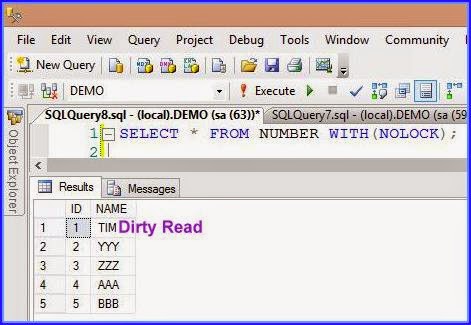
SELECT * FROM NUMBER WITH(NOLOCK);


From the output you can see that the name for ID is TIM. The data for ID 1 is inconsistent. This is DIRTY READ. What if the update transaction is roll backed, well in that case the select statement read the data which never existed in database.

Now lets see that how READPAST will behave in this situation:

SELECT * FROM NUMBER WITH(READPAST);


From the output you can see that the record  for ID 1 is missing. As this row is locked by some other transaction. So READPAST table hint skipped that row.

Rollback the above update transaction. Now, Clean the database "DEMO" as:

Use master
Go
Drop Database Demo
Go

Thanks For Reading this Post!!!